Automation
Automating Lead Intake with n8n: Speed Is the Feature
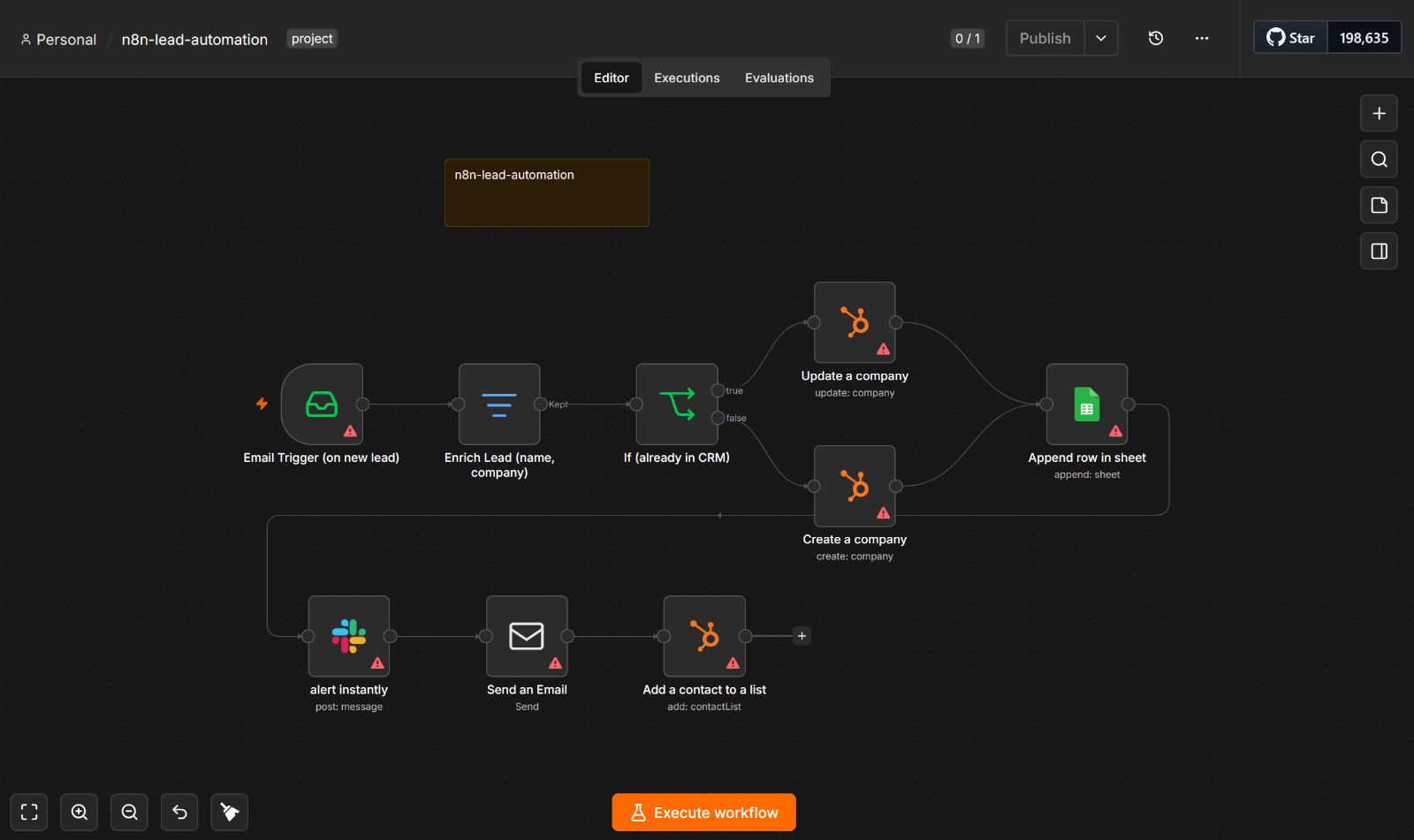
On a side project, incoming leads had a very unglamorous fate: they landed in an email inbox and waited there until I got around to checking it. Sometimes that was minutes. Sometimes hours. Every one of those gaps was a chance to lose the lead to whoever replied faster.
The fix wasn't a bigger tool or a CRM upgrade. It was removing me from the critical path. I rebuilt the entire intake as an n8n workflow that runs the moment a lead arrives, no human required.
The workflow
A new lead email is the trigger. From there, the automation runs a chain:
1. Enrich the lead. An email address alone is nearly useless. The first step gathers the surrounding context — name, company, and other available details — so what enters the pipeline is an actual profile, not just a string.
2. Check the CRM. Before doing anything, the workflow asks a simple but critical question: is this person already in HubSpot?
3. Route conditionally. This is the branch that makes the whole thing trustworthy. If the lead already exists, their record gets updated. If they don't, a new record is created. Without this split, you either create duplicate contacts for every returning lead or overwrite things you shouldn't. The conditional routing is what separates a useful automation from one that quietly corrupts your data.
4. Log to Google Sheets. In parallel, the lead gets appended to a Google Sheet — a lightweight, glanceable view of everything coming in, without having to open the CRM.
5. Alert on Slack. A message fires instantly so I know a lead landed the second it happens, not whenever I next check email.
6. Send a follow-up email. An automatic response goes out immediately, so the lead gets acknowledged even if I'm away from my desk or asleep.
7. Tag the lead. Finally, the record is tagged so the pipeline stays organized and downstream steps know how to treat it.
The entire sequence completes in seconds, consistently, every time, without my involvement.
The part that actually mattered
It's tempting to think the value is in the number of tools connected — email, HubSpot, Sheets, Slack. It isn't. Wiring services together is the easy part; that's what these platforms are built for.
The part that took real thought was the conditional routing — the create-vs-update decision. "Add the lead to the CRM" sounds like one action until you account for the lead who already exists. Get that branch wrong and you either flood the CRM with duplicates or clobber existing data. Getting it right is what makes the automation something you can actually trust to run unattended.
The broader takeaway
Most "sales automation" isn't really about sales, and it isn't about clever tools. It's about deleting the human delay between a lead arriving and a lead being handled. Speed is the feature. A prospect who gets a response in thirty seconds is in a fundamentally different conversation than one who hears back in three hours.
The tools just make that speed possible. The thinking — what to check, when to branch, what not to duplicate — is still the actual work.