AI Agents
I Built an AI Agent That Decides for Itself — Here's the Part That Actually Matters
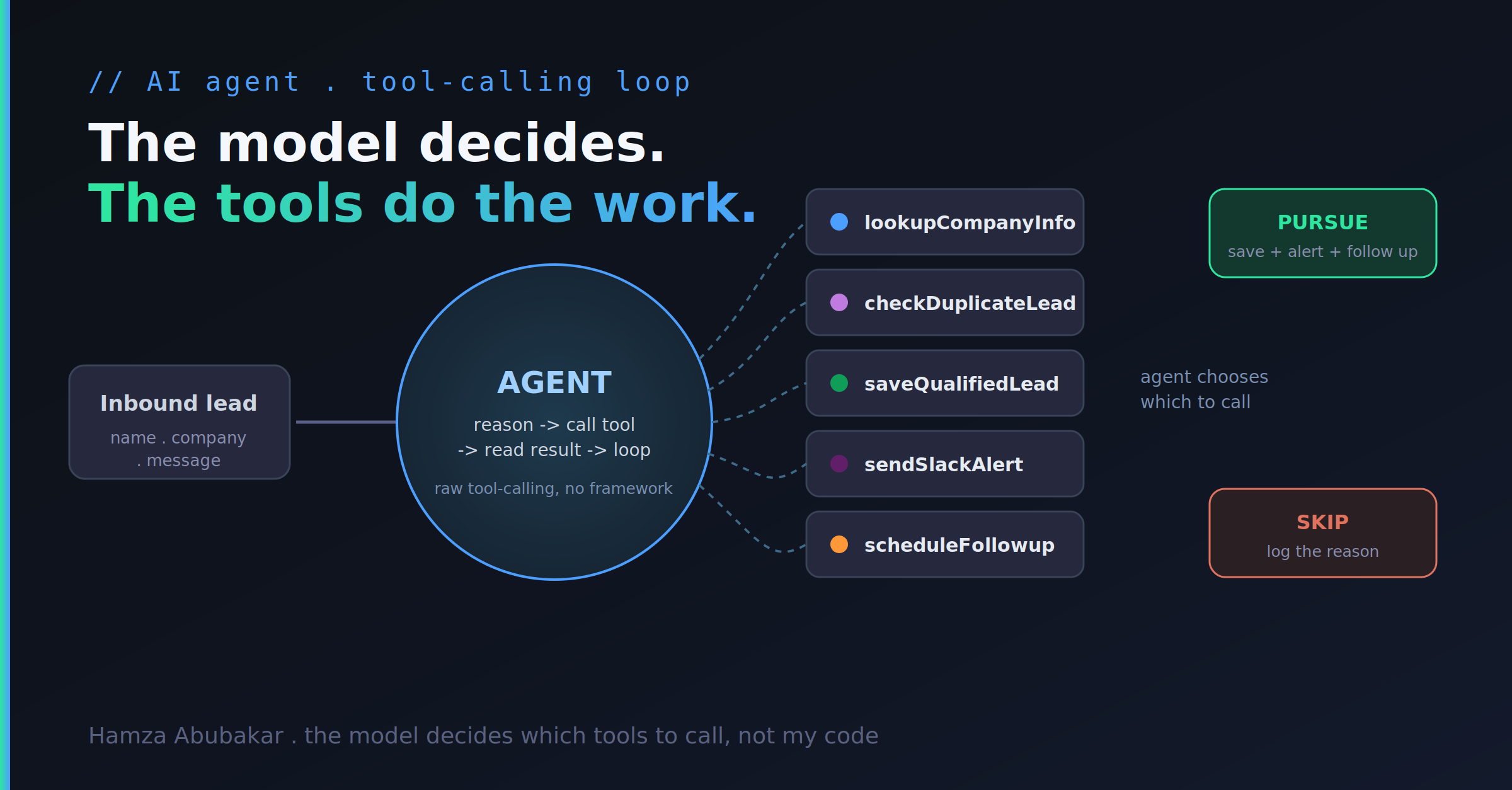
There's a meaningful difference between a chatbot and an agent, and most "AI-powered" products blur it. A chatbot responds. An agent decides and acts — it chooses which tools to call, in what order, based on what it works out along the way.
To understand that line properly, I built one from the primitives — and then gave it enough real tools to actually do the job end to end.
What it does
It's a lead-qualification agent. An inbound sales lead arrives — a name, a company, and a message. From there, the agent runs on its own:
- Verifies the company. It calls a
lookupCompanyInfotool that returns size, industry, and funding stage from a real data provider. - Checks for duplicates. Before doing anything,
checkDuplicateLeadconfirms this person isn't already in the system, so the agent never creates the same lead twice. - Decides whether to pursue. Based on the verified company data and the content of the message, the model judges whether this lead is worth acting on.
- Acts — but only if it decides to. If, and only if, it concludes the lead is worth pursuing, it calls
saveQualifiedLeadto write the lead to a Postgres database with a score and its written reasoning, then firessendSlackAlertto notify the team andscheduleFollowupto line up the next touch. - Skips cleanly otherwise. If it decides the lead isn't worth it, it skips the action tools entirely and logs why.
The crucial detail: I did not write the "if qualified, then act" branch. There's no if (score > threshold) in my code. The decision to call the action tools is made by the model. My code's only job is to make the tools available and run the loop. That inversion — the model choosing the actions instead of following my hardcoded path — is what makes it an agent rather than a script with an LLM bolted on.
How it's built
Raw tool-calling, using the Vercel AI SDK's generateText with a tools definition and stopWhen to control the loop. No LangChain, no LangGraph. Just the model, the tool schemas, and the execution loop.
I chose the primitives on purpose. Frameworks are convenient right up until something breaks, at which point they become a black box you can't debug. Building from the base means when this runs against real systems and misbehaves, I know exactly which layer to look at.
The tools themselves do real work: lookupCompanyInfo hits an external data API, checkDuplicateLead and saveQualifiedLead read from and write to Postgres, sendSlackAlert posts to a real channel, and scheduleFollowup queues the next action. Every tool call is wrapped with error and retry handling — because an agent that takes actions on live systems has to survive an API timing out or a write failing without corrupting its own reasoning or leaving the data half-written.
The bug nobody warns you about
Here's the thing that trips up almost everyone building their first agent, and that the framework tutorials paper over:
With default settings, the model calls your tool — and then returns empty text. No answer. Nothing.
The reason is that a single generation step ends once the model emits a tool call. It fires the tool, gets the result back, and... stops, because nothing told it to keep going. To get an actual agent — one that calls a tool, reads the result, and then continues reasoning toward the next tool call or a final decision — you have to explicitly enable multi-step execution (via stopWhen / step configuration).
I hit this wall, understood why it happens at the loop level, and fixed it deliberately. That's a very different thing from copy-pasting a framework's agent wrapper that happens to set the right flag for you — because when that wrapper breaks, you're stuck, and when the primitive breaks, you're not.
An extension: giving the agent memory
I also built a variant with an additional tool, searchCompanyNotes — a pgvector-backed semantic search over a set of ingested research notes. This connects the agent work directly to my earlier RAG project, Recall: now the agent can retrieve relevant context before deciding, not just look up structured fields. Retrieval becomes one more tool the agent chooses to call, when it decides it needs more information.
Why this matters beyond a demo
This same pattern — model, real tools, a loop, error handling — is the engine behind every "AI that does real work" you've seen: support agents that resolve tickets, ops bots that take actions across systems, research assistants that gather and synthesize. Strip away the branding and it's this. A model deciding which tools to call, and a loop that lets it keep going until the job is done.
It isn't magic, and it isn't a framework you install. It's a mechanic you can understand completely. And understanding it completely — including what happens when a tool call fails — is exactly what lets you build it so it doesn't fall over the first time reality doesn't match the happy path.